

Your Restaurant Bucket List – no more debates
Stop the chat chaos: With soonish you collect restaurants, vote with emojis, and automatically have a fair order. More time for eating – less for debating.
No account needed • Join with share code • Decide in seconds


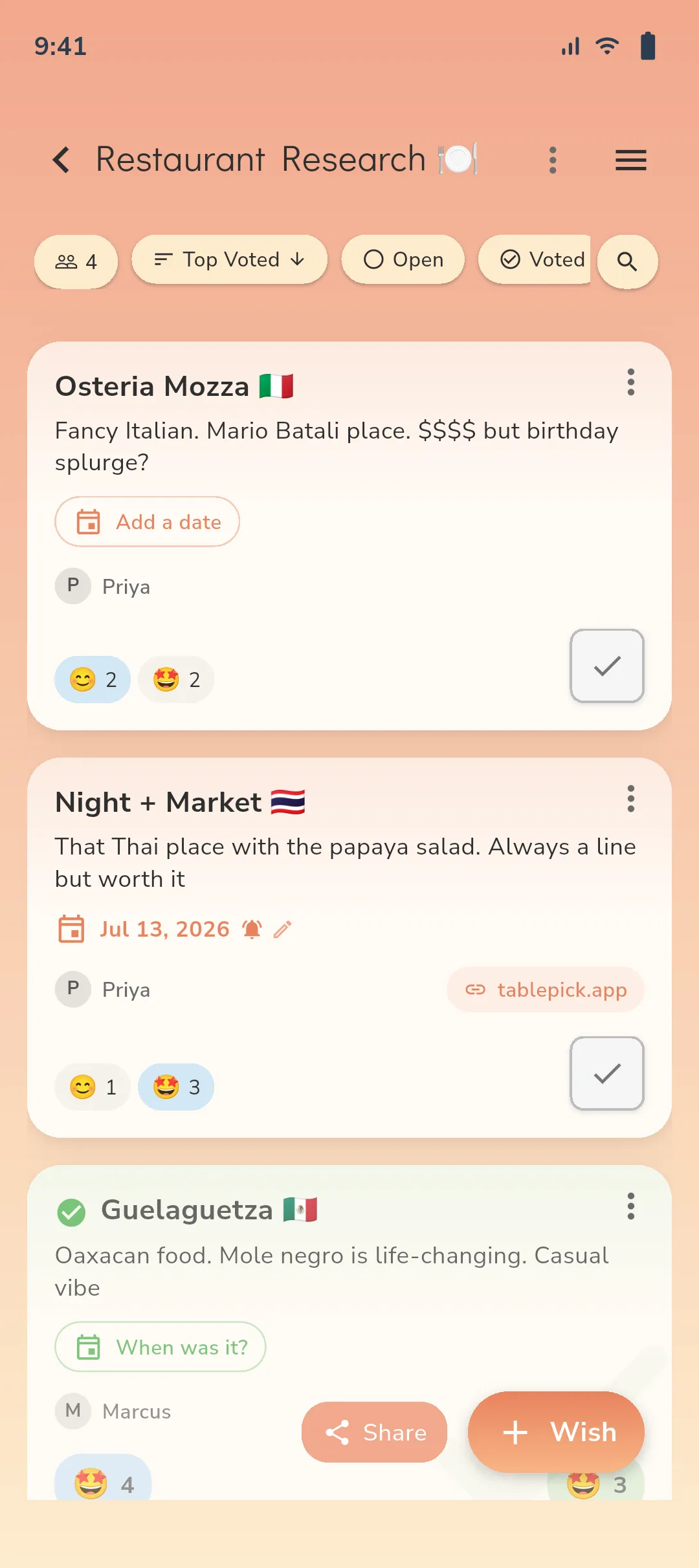
Planning together is fun – already used by dozens of groups.


Discussion Marathon Discussion Marathon vs. Lightning Decision
Before
- ❌ Endless debates "Where should we eat?"
- ❌ Ideas disappear in messenger
- ❌ Evening time wasted on planning
- ❌ End up at the same restaurant again
Now
- ✅ All suggestions centralized & searchable
- ✅ Emoji votes instead of voting marathons
- ✅ Automatically fair ranking
- ✅ Check off visits & briefly rate

It's This Easy
-
1) Start List ✨
Create a restaurant list – no account needed. Takes 5 seconds.
-
2) Share Your Code 🔑
Share your 8-char code. Friends enter it in the app and join instantly.
-
3) Vote Together 🗳️
Everyone votes with emojis. Visible consensus forms automatically.
-
4) Experience & Rate 🤩
Go, enjoy, then rate with emoji. Build your shared food diary.
Group Experiences

"We just go through the list from top to bottom. Zero discussion."

"Emoji voting feels fair – no one dominates."

"Discovered 15 new spots – without chat scrolling."
Ready for Your Restaurant List?
Get started in under 10 seconds – free, no registration, forever. Share link & go.
Frequently Asked Questions About Restaurant Lists
What is a restaurant bucket list? +
A shared list of your dream restaurants. You collect suggestions, prioritize with emojis, and work through the list in order.
Do I need an account for the restaurant list? +
No. soonish works without registration. Create list, share link, done.
How does the ranking emerge from emojis? +
Each reaction has a weight (e.g., ⭐, 🌟, 🔥). soonish sums the votes and automatically creates a ranking. Ties are displayed – you decide spontaneously.
Can we create multiple restaurant lists (e.g., lunch, dinner, budget)? +
Yes. Create as many lists as you want – e.g., by time of day, neighborhood, or cuisine. Everything stays organized.
Can we add notes like "vegan" or "reservation needed"? +
Sure. Use short tags or the description to add hints like "vegan", "gluten-free", "reservation", "outdoor seating".
How do we avoid duplicate suggestions? +
Thanks to the central list, you immediately see if a spot already exists. Use search/filter before adding something new.
What happens after visiting a restaurant? +
You check off the entry, give a brief rating or note (e.g., favorite dish) – this way your culinary archive grows.
Does the restaurant list work on mobile too? +
Yes. soonish is a mobile app. Adding an entry or voting takes just seconds.
Can outsiders see our list? +
Lists are only accessible via your shared link. Only share the link with people you want to invite.
What if someone in the group doesn't like emojis? +
Emojis are quick and intuitive. If someone prefers, they can additionally comment briefly – the priority still emerges without debate.
Can we filter by neighborhood/price/tags? +
Yes. Use tags and filters to quickly find suitable spots – e.g., "under $20", "vegan", "Downtown".
Is the ranking binding – or can we decide spontaneously? +
The ranking is a recommendation. You can choose spontaneously at any time – soonish stays flexible.
How large can our group be? +
Whether two people or a large crew – the more votes, the more helpful the ranking. soonish scales with your group.
What if we change our minds or need to postpone? +
No problem. The ranking is dynamic. Re-sort, change notes, or create a second list (e.g., "Date Night").
What does soonish cost – and is there advertising or tracking? +
soonish is free, without registration, forever. Minimalist and focused on functionality. No registration, no social feed. Details about privacy & usage can be found in the footer.